Why Automate Data Processing? 5 Strategic Reasons (2026)
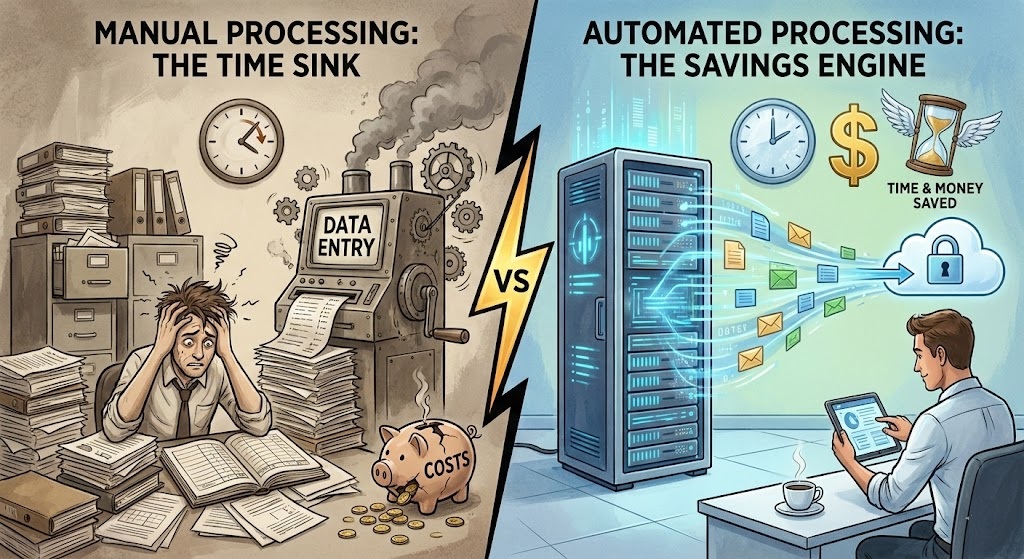
In the fast-paced world of 2026, data is the new currency. However, raw data locked in PDFs, emails, and forms is useless until it is processed. Many businesses still rely on armies of staff to manually key information into spreadsheets. This approach is slow, expensive, and prone to error. Leaders are increasingly asking why automate data processing, not just to save money, but to survive.
Automation is no longer a luxury for Fortune 500 companies; it is a necessity for any business that wants to scale. This guide explores the strategic imperatives behind automation, explaining exactly why automate data processing is the lever that transforms operational drag into competitive advantage.
Table of Contents
- 1. The Hidden Tax of Manual Work
- 2. Reason #1: Scalability Without Headcount
- 3. Reason #2: Accuracy and Data Integrity
- 4. Reason #3: Speed to Insight (Real-Time Analytics)
- 5. Reason #4: Employee Satisfaction and Retention
- 6. Reason #5: Compliance and Security
- 7. How to Start Automating Today
Quick Comparison: The Cost of Inaction
| Metric | Manual Processing | Automated Processing |
|---|---|---|
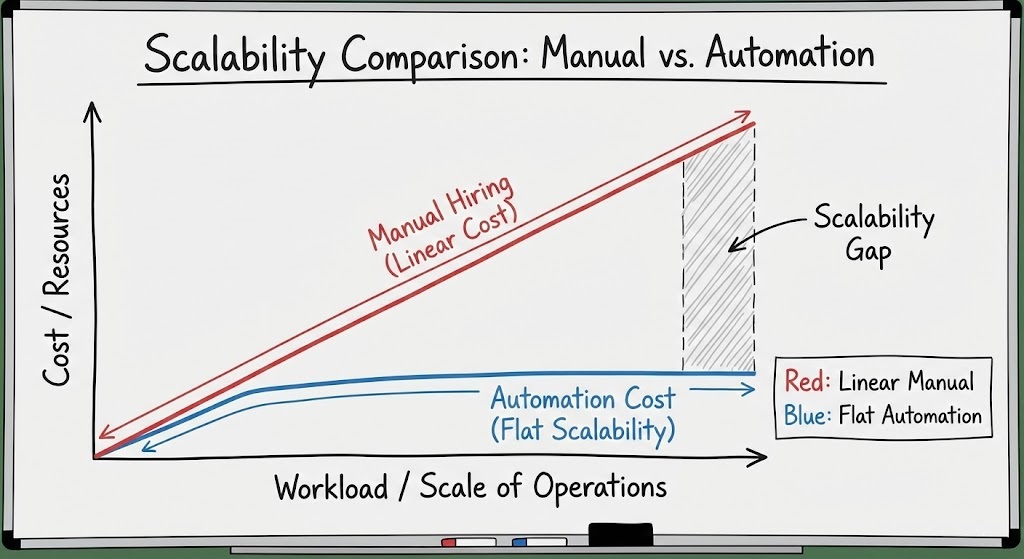
| Cost Structure | Linear (More data = More staff) | Flat (Software subscription) |
| Error Rate | 1% – 4% (Human Error) | < 0.1% (Systematic) |
| Processing Time | Days (Batch processing) | Seconds (Real-time) |
1. The Hidden Tax of Manual Work
Before answering why automate data processing, we must look at the cost of the status quo. Manual data entry is often viewed as a “sunk cost,” but it acts as a tax on growth. Every hour a finance manager spends re-typing an invoice is an hour not spent on financial strategy.
According to McKinsey, companies that digitize their document workflows can reduce overhead by up to 40%. The question isn’t “can we afford software?”; it is “can we afford to keep paying humans to act like robots?”
2. Reason #1: Scalability Without Headcount
The primary reason why automate data processing is scalability. In a manual setup, doubling your revenue usually means doubling your back-office staff. This creates a ceiling on growth.
Automation breaks this link. An AI-powered pipeline using tools like ParserData can process 5,000 documents just as easily as it processes 50. It allows your business to handle spikes in demand (like Black Friday or Tax Season) without the panic of hiring and training temporary staff.
3. Reason #2: Accuracy and Data Integrity
Humans get tired. They get distracted. A single “fat-finger” error in a spreadsheet can cost thousands of dollars in overpayments or tax fines. IBM estimates that bad data costs the U.S. economy $3.1 trillion annually.
This is a compelling argument for why automate data processing. Automated systems follow rigid logic rules. If an extracted value doesn’t match the expected format (e.g., a date in the future), the system flags it immediately. This ensures data integrity across your organization.
4. Reason #3: Speed to Insight (Real-Time Analytics)
In manual workflows, data is often processed in batches usually at the end of the week or month. This means your dashboard is always looking in the rearview mirror.
When you understand why automate data processing via API integration, you unlock real-time analytics. As soon as a sales order is received, it is extracted, validated, and pushed to your ERP. This allows leadership to make decisions based on what is happening now, not what happened last week.
Pro Tip: Don’t aim for 100% automation immediately. Configure your system with a “Confidence Threshold” (e.g., 85%). If the AI is unsure about a fuzzy scanned receipt, it should automatically route that single document to a human for review, ensuring zero errors enter your ledger.
5. Reason #4: Employee Satisfaction and Retention
No one went to college to copy-paste data from PDFs to Excel. High turnover in operations teams is often driven by boredom and burnout from repetitive drudgery. Zapier reports that employees are happier when automation handles the mundane tasks.

By automating the boring stuff, you retain your best talent. You empower them to focus on problem-solving, vendor relationships, and analysis. This “Soft ROI” is a crucial factor when explaining why automate data processing to HR and management.
6. Reason #5: Compliance and Security
Manual processes are opaque. If an error occurs, it is hard to trace who made it and when. Automation creates a perfect digital audit trail. Every document ingestion, every extracted field, and every API call is logged.
For industries regulated by GDPR, HIPAA, or SOC-2, this is vital. Understanding why automate data processing is also about understanding risk management. Secure automation platforms offer encryption and access controls that a shared folder of PDFs simply cannot provide.
7. How to Start Automating Today
The journey to automation doesn’t require a massive IT overhaul. You can start with a single workflow, such as invoice extraction.
Step 1: Use ParserData to handle the ingestion and parsing of your unstructured documents.
Step 2: Connect the output to your existing tools (Google Sheets, QuickBooks) using n8n.
Pro Tip: Never automate a broken process. Before setting up ParserData, map out your current workflow on a whiteboard. Simplify the steps first, then apply automation. As the saying goes, “Automating a mess just yields a faster mess.”
We have prepared a ready-made template to help you take the first step.
🚀 Download Free n8n Workflow Template
Conclusion
Ultimately, the decision to automate is not just about upgrading software; it is about upgrading your business mindset. The question why automate data processing evolves into “how fast can we scale?”
By removing the friction of manual entry, you unlock a new tier of operational excellence. You gain the agility to pivot instantly based on real-time data, the security to pass any audit, and the culture to attract top-tier talent. Do not let manual workflows be the anchor that holds your business back in a digital-first world.
Ready to automate? Visit ParserData to start transforming your documents into data today.
Frequently Asked Questions
Does automation completely remove the need for humans?
No. Automation handles the repetitive “grunt work” (data entry), but humans are still needed for decision-making, exception handling, and strategic analysis. It changes the role from “typist” to “analyst“.
Is data processing automation secure?
Yes, if you choose the right tools. Enterprise-grade automation platforms use encryption (TLS 1.3) and comply with SOC-2 standards, making them often more secure than manual email handling.
How quickly can I see ROI from automation?
Most companies see ROI within 3 to 6 months. The immediate reduction in manual labor hours and the elimination of costly data entry errors provide rapid financial payback.
Can I automate legacy systems without APIs?
Yes. While APIs are preferred, modern automation tools can ingest CSVs or flat files generated by legacy systems, parsing them into structured formats for modern databases.
What is the biggest risk of not automating?
The biggest risk is the inability to scale. As your business grows, manual data entry becomes a bottleneck that slows down cash flow, customer service, and decision-making.
Recommended
- How to Automate Data Extraction: 5 Step Guide
- Business Document Automation Explained
- What Is Data Extraction? Core Concepts
- 10 Automation Best Practices to Scale Operations
Disclaimer: All comparisons in this article are based on publicly available information and our own product research as of the date of publication. Features, pricing, and capabilities may change over time.