What Is Data Extraction? The Complete Guide for Finance (2026)
In the digital age, businesses are drowning in data but starving for insights. Every day, companies generate terabytes of information, yet much of it remains locked in “dead” formats like PDF invoices, scanned receipts, and email threads. Understanding what is data extraction is the first step to unlocking this value.
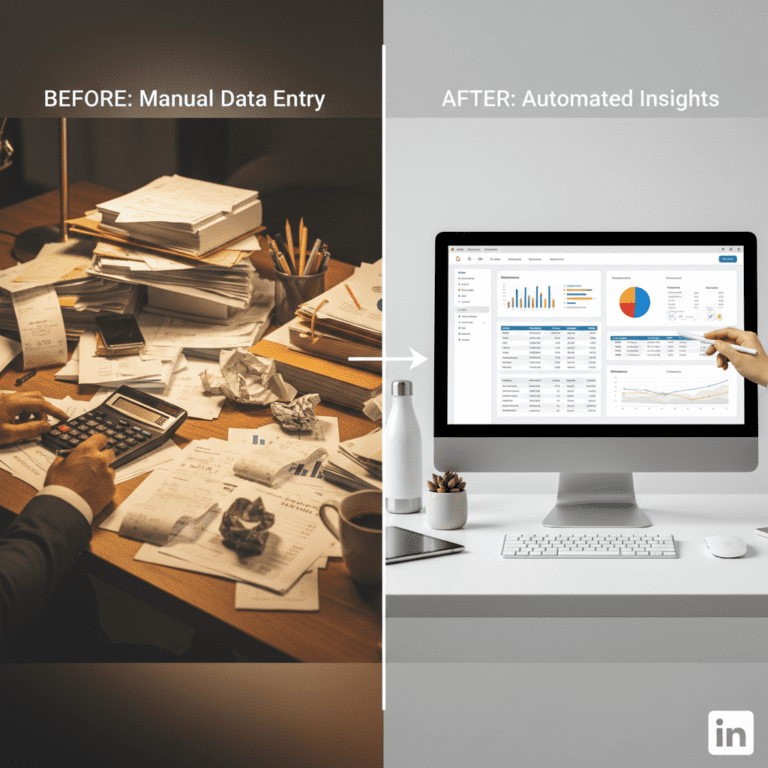
Ideally, all systems would talk to each other seamlessly. In reality, finance teams spend 30% of their time manually re-typing information from one screen to another. This article demystifies the technology behind automation, explaining what is data extraction, how it fits into the ETL process, and why it is critical for scaling operations in 2026.
Table of Contents
- 1. Defining Data Extraction: The Core Concept
- 2. Structured vs. Unstructured Data
- 3. The Role of Data Extraction in ETL
- 4. Manual vs. Automated Methods
- 5. How AI is Changing the Game
- 6. Key Use Cases in Finance
- 7. Tools to Get Started
Quick Summary: Extraction Types
| Type | Description | Best Use Case |
|---|---|---|
| Manual | Human copy-pasting | Low volume (< 5 docs/week) |
| OCR | Optical Character Recognition | Simple, high-quality scans |
| AI / IDP | Intelligent Contextual Parsing | Complex invoices, variable layouts |
| Web Scraping | HTML parsing | Competitor price monitoring |
1. Defining Data Extraction: The Core Concept
So, what is data extraction exactly? In technical terms, it is the automated process of retrieving specific, relevant information from various sources (databases, documents, websites) and converting it into a standardized format for further processing or storage.
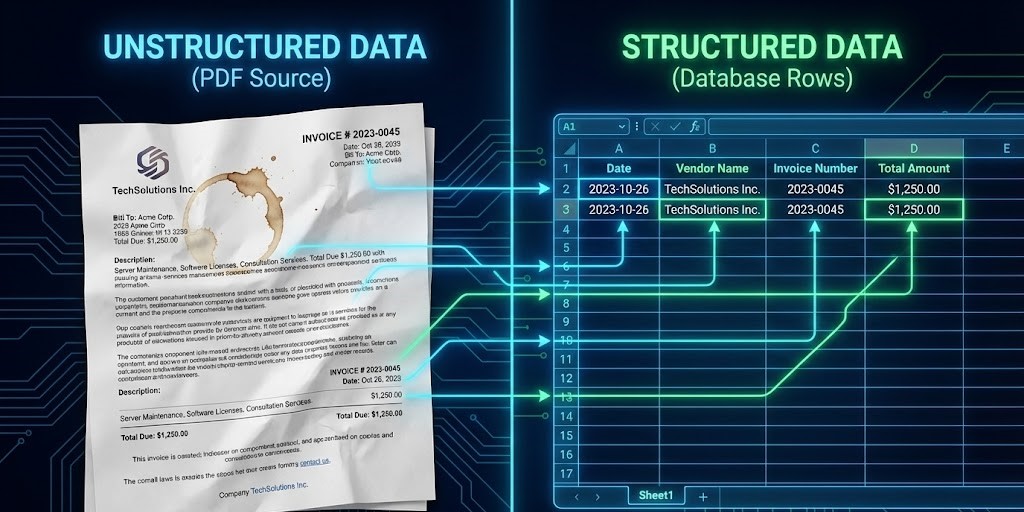
According to TechTarget, this is the foundational step in data management. Without extraction, data is just “noise.” For a finance manager, extraction means turning a PDF vendor invoice into a row in an Excel sheet containing only the Date, Vendor Name, and Total Amount, discarding the logos and marketing text.
2. Structured vs. Unstructured Data
To fully grasp what is data extraction, you must understand the two types of data it handles. Most business data (over 80%, according to Forbes) is unstructured.
- Structured Data: Organized, searchable data (e.g., SQL databases, Excel files, CSVs).
- Unstructured Data: Disorganized information (e.g., Emails, PDF contracts, Images, Audio).
The goal of extraction is to move data from the “Unstructured” bucket to the “Structured” bucket. This allows tools like Business Analytics to actually read and visualize the numbers.
3. The Role of Data Extraction in ETL
In the world of data engineering, extraction is the “E” in ETL (Extract, Transform, Load). IBM defines ETL as the procedure that copies data from various sources to a destination system.
- Extract: Pulling the raw data (e.g., reading an Invoice PDF).
- Transform: Cleaning and standardizing (e.g., converting “20/01/26” to “2026-01-20”).
- Load: Saving it to the target (e.g., sending it to QuickBooks via API).
When you ask what is data extraction, you are essentially asking about the starting point of this entire data lifecycle.
4. Manual vs. Automated Methods
Historically, extraction was manual. A clerk would look at a paper document and type the numbers into a computer. This method is fraught with risks. As we highlighted in our automation best practices guide, manual entry is not scalable and has an error rate of approx. 1-4%.
Automated Data Extraction uses software to do this work. It reduces processing time from minutes to seconds. For high-growth companies, shifting from manual to automated extraction is non-negotiable for maintaining operational efficiency.
5. How AI is Changing the Game
Traditional tools used regular OCR (Optical Character Recognition) which relied on templates. You had to tell the software exactly where to look for the “Total”. If the vendor moved the total by one inch, the extraction failed.
Modern solutions like **ParserData** use AI-powered extraction. This uses Large Language Models (LLMs) to understand context. The AI reads the document like a human does, finding the “Total” regardless of where it is located on the page. This capability explains what is data extraction in the modern era: it is intelligent, adaptive, and template-free.
6. Key Use Cases in Finance
Finance is the primary beneficiary of extraction technology. Here are common scenarios:
- Invoice Processing: Automatically extracting vendor names, line items, and tax amounts to populate AP systems.
- Expense Management: Scanning receipts to verify employee reimbursement claims.
- Bank Reconciliation: Extracting transaction lines from PDF bank statements to match against ledger entries.
For a deep dive into specific workflows, read our guide on how to extract data from PDFs efficiently.
7. Tools to Get Started
Knowing what is data extraction is useless without the right tools. You need a platform that combines OCR accuracy with API flexibility. ParserData offers a seamless way to convert documents into data.
Furthermore, you can connect this extraction capability directly to your other apps. We have built a ready-to-use n8n workflow that demonstrates this power.
🚀 Download Free n8n Workflow Template
Pro Tip: When choosing a tool, always test it on your “worst” documents (scanned, crumpled, or low-light) to see how the AI handles noise.
Conclusion
So, what is data extraction? It is the bridge between the chaotic world of documents and the orderly world of databases. By automating this process, you gain speed, accuracy, and the ability to scale without hiring an army of data entry clerks. In 2026, it is not just a “nice-to-have” tool; it is a competitive advantage.
Frequently Asked Questions
What is data extraction in simple terms?
In simple terms, data extraction is the automated process of retrieving specific information from unstructured sources (like PDFs or emails) and converting it into a structured format like Excel or a database.
How does data extraction differ from data mining?
Data extraction focuses on retrieving data from sources. Data mining analyzes that data to find patterns. Extraction is the necessary first step before mining can occur.
Is data extraction the same as OCR?
Not exactly. OCR (Optical Character Recognition) turns images into text. Data extraction goes further by understanding the context of that text and organizing it into structured fields (e.g., identifying ‘Total Amount’).
What are the main challenges of data extraction?
The biggest challenges are handling varying document layouts, dealing with poor quality scans (noise), and maintaining security compliance when processing sensitive financial data.
Can I extract data from handwritten documents?
Yes, modern AI-powered extraction tools utilize Intelligent Document Processing (IDP) to recognize and digitize handwriting with increasing accuracy, though it remains harder than printed text.
Recommended
- 10 Automation Best Practices to Scale Finance Operations
- How to Extract Data from PDFs: 5 Efficient Ways
- The Hidden Manual Invoice Processing Cost in 2026: A CFO’s Guide
- Invoice Data Extraction API: 4 Powerful Steps
Disclaimer: All comparisons in this article are based on publicly available information and our own product research as of the date of publication. Features, pricing, and capabilities may change over time.