
7 Types of Financial Data Extraction: The Complete 2026 Guide
In the fast-paced ecosystem of modern fintech, data is the new currency. However, a staggering amount of this currency is frozen in static formats: PDFs, scanned images, and paper receipts. For CFOs and developers alike, understanding the different types of financial data extraction is the first step toward unlocking this value.
Financial data extraction is not a monolith; it is a spectrum of technologies and use cases. It ranges from simple optical recognition to complex, AI-driven analysis of unstructured contracts. Choosing the right method can mean the difference between a streamlined, automated workflow and a costly, error-prone disaster.
In this comprehensive guide, we categorize the types of financial data extraction by methodology and document class, providing you with a roadmap to modernize your financial operations in 2026.
Table of Contents
- 1. The Methodology Spectrum: How Extraction Works
- 2. Type 1: Invoice Data Extraction (AP Automation)
- 3. Type 2: Receipt Scanning & Expense Management
- 4. Type 3: Bank Statement Parsing
- 5. Type 4: Purchase Order (PO) Matching
- 6. Type 5: Financial Statement Analysis (P&L, Balance Sheets)
- 7. Type 6: Tax Form Processing
- 8. Type 7: Contract & Legal Extraction
- 9. Implementation Strategy & ROI
1. The Methodology Spectrum: How Extraction Works
Before diving into specific documents, it is crucial to understand that there are different technical types of financial data extraction. Not all tools are created equal.
A. Manual Data Entry (The Legacy Approach)
This is the baseline. Humans read a document and type the data into an ERP like SAP or Quickbooks.
- Accuracy: Variable (Average 1-4% error rate).
- Speed: Slow (Avg. 5 minutes per invoice).
- Verdict: Obsolete for scaling businesses.
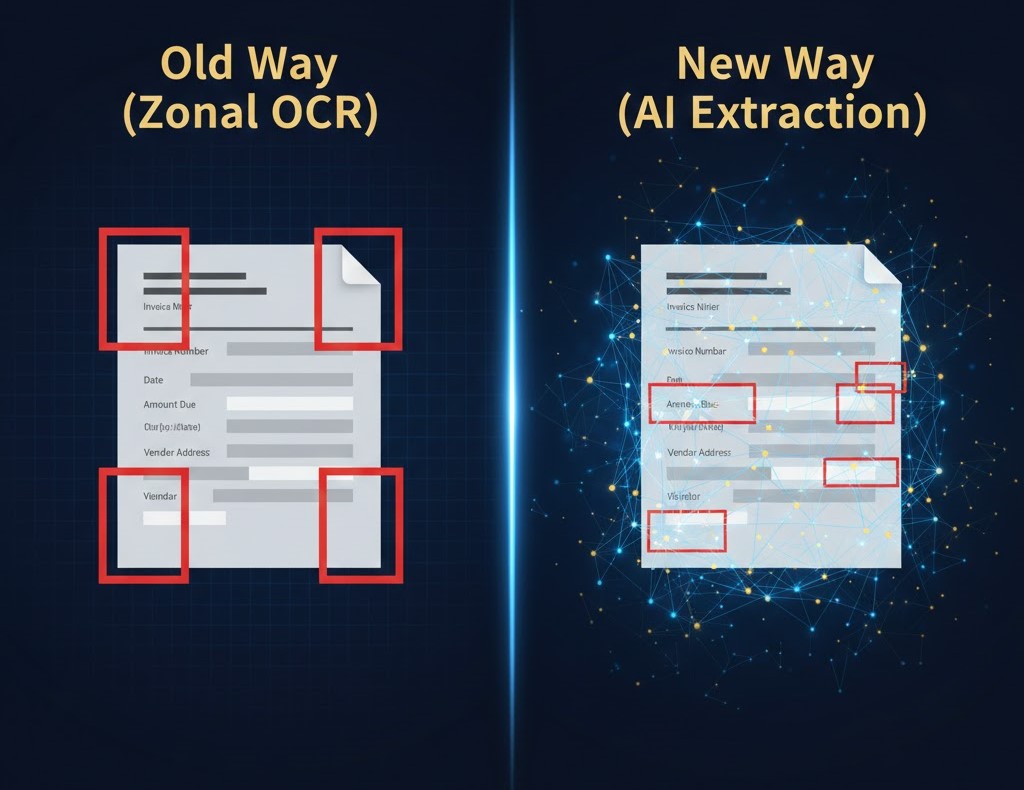
B. Template-Based OCR (Zonal Extraction)
This technology uses “zones“. You draw a box on a screen and tell the software: “The Date is always in the top right corner“.
- Best For: Standardized forms that never change.
- Limitation: If a vendor moves their logo one inch to the left, the extraction breaks.
C. Cognitive AI & Intelligent Document Processing (IDP)
This is the modern standard used by platforms like ParserData. It uses Machine Learning to understand the context of the document. It doesn’t look for a specific coordinate; it looks for the concept of “Total Amount” regardless of where it is located on the page.
- Context: Read our deep dive on how to extract data from PDFs to understand the mechanics of IDP.
2. Type 1: Invoice Data Extraction (AP Automation)
Of all the types of financial data extraction, invoice processing is the most common and high-value use case. Accounts Payable (AP) departments are often buried under mountains of invoices from hundreds of different suppliers, each with a unique layout.
What Data is Extracted?
- Header Level: Invoice Number, Date, Vendor Name, Total Amount, Tax Amount.
- Line Item Level: Description, Quantity, Unit Price, SKU.
The Challenge of Tables
Invoices often contain multi-page tables. A simple OCR tool will fail here. You need an engine capable of “Table Stitching” recognizing that a table starting on page 1 continues onto page 2.
Statistic: According to Goldman Sachs, automation can reduce the cost of processing an invoice from roughly $12 to under $5.
Effective extraction here directly feeds into financial document automation tools to enable auto-payment and approval workflows.
3. Type 2: Receipt Scanning & Expense Management
Receipt extraction is arguably one of the most challenging types of financial data extraction due to poor image quality and varying formats. Unlike invoices, which usually follow a standard A4 layout, receipts come in endless shapes and sizes. They suffer from physical degradation thermal paper fades, employees crumple them in pockets, and smartphone photos often have bad lighting or skew.
To handle these specific types of financial data extraction, simple OCR is insufficient. You need an AI model trained on “Real-world noise” that can distinguish between a coffee stain and a decimal point. Furthermore, the system must handle merchant normalization (mapping “Starbucks Store #442″ to “Meals & Entertainment“) to fully automate the expense reporting workflow.
Key Features Required
- Image Pre-processing: The system must automatically “de-skew” (straighten), crop, and enhance the contrast of a photo taken by a smartphone.
- Merchant Normalization: Converting “Sbux 4452” to “Starbucks” for clean accounting.
- Category Tagging: Automatically assigning the receipt to “Meals” or “Travel” based on the line items.
Use Case: Fraud Detection
Advanced extraction can flag anomalies, such as a “Dinner” receipt that includes alcohol on a non-policy day, ensuring compliance before reimbursement.
4. Type 3: Bank Statement Parsing
Bank statements are critical for reconciliation. However, downloading CSVs from every bank portal is tedious, and PDFs are often “Digital Paper” that cannot be edited.
The Structured Data Goal
The goal here is to convert the PDF statement into a clean JSON or Excel format to match against the General Ledger.
Specific Difficulties
- Nested Transactions: Some banks group fees under a main transaction, creating complex hierarchies.
- Multi-Language Support: Global companies need to parse statements in different languages and currencies.
- Security: Since this involves highly sensitive cash-flow data, using a secure API for data integration is safer than manual handling via email.
5. Type 4: Purchase Order (PO) Matching
In a healthy procurement cycle, every Invoice should have a corresponding Purchase Order (PO). Extracting data from POs is essential for the “3-Way Match” process (matching the PO, the Invoice, and the Receipt of Goods).
Why Automate PO Extraction?
By automating one of these critical types of financial data extraction, you prevent overpayment and unauthorized spending significantly. This process is the cornerstone of the “3-Way Match” (validating the PO against the Invoice and the Goods Receipt).
Without automation, “Maverick Spend” – purchases made without an approved contract—can bleed a company’s budget. Effective extraction captures line-item details (SKUs, quantities, and agreed unit prices) from the PO PDF. It then compares them instantly against the incoming invoice. If the invoice price is higher than the extracted PO price, the system automatically flags the discrepancy for review, ensuring you never pay more than what was negotiated.
- Key Fields: PO Number, Vendor details, Authorized Amount, Delivery Date.
- Goal: To automatically flag invoices that exceed the pre-approved PO amount.
6. Type 5: Financial Statement Analysis (P&L, Balance Sheets)
For lenders and auditors, dealing with balance sheets represents one of the most analytical types of financial data extraction required for risk assessment. A Profit & Loss (P&L) statement or a Balance Sheet is not just a list of numbers; it is a hierarchical tree of financial health.
The challenge lies in standardization. One company might list “Rent“, while another lists “Leasehold Obligations“. Advanced extraction tools must parse these nested rows and map them to a standardized taxonomy (GAAP or IFRS). This allows investment firms to ingest thousands of PDFs from different companies and output a clean, comparable Excel model for credit scoring.
The Complexity Factor
A Balance Sheet might list “Cash and Equivalents” in one row or split it into three.
- The Solution: Specialized AI models that can normalize these variations into a standardized financial template (e.g., mapping both “Rent” and “Lease” to a single “Occupancy Cost” category).
- Use Case: Commercial underwriting. Banks use this technology to process loan applications in minutes rather than days.

7. Type 6: Tax Form Processing
Tax season creates a massive spike in document volume. Whether it is W-2s, 1099s, or VAT returns, these forms are strictly standardized but often come in mixed quality (scanned, photographed, or digital).
High Accuracy Requirement
In tax processing, a “99% accuracy” rate is often not good enough; a single digit error can lead to audits.
- Validation: Good extraction tools cross-reference the extracted data with mathematical logic (e.g., ensuring
Taxable Income * Rate = Tax Due). - Format: Data is usually exported to XML or specific government-mandated formats.
8. Type 7: Contract & Legal Extraction
Legal analysis is often considered the final frontier among all types of financial data extraction because contracts utilize unstructured text, not simple tables. Here, the “data” is hidden within dense paragraphs of legalese.
The goal isn’t just to find a dollar amount, but to extract conditions. For example, identifying a “Net 60” payment term buried in Clause 4, or finding a penalty percentage for late delivery. NLP (Natural Language Processing) models are essential here. They scan the document to answer semantic questions like “When does this agreement expire?” or “Is there an auto-renewal clause?”, turning static PDF contracts into a dynamic database of financial liabilities.
Extracting Obligations, Not Just Numbers
Here, the goal is to find extraction points buried in paragraphs of legalese:
- Payment Terms: “Net 30” vs “Net 60”.
- Renewal Dates: When does the contract expire?
- Penalty Clauses: What is the fee for late payment?
Using Natural Language Processing (NLP), finance teams can turn a repository of PDF contracts into a searchable database of financial liabilities.
9. Implementation Strategy & ROI
Knowing the types of financial data extraction is step one. Implementing them requires a strategy.
Step 1: Audit Your “Dark Data”
When prioritizing different types of financial data extraction, identify which document class consumes the most manual labor hours. Don’t try to automate everything at once. Start by mapping your volume versus complexity.
- High Volume, Low Complexity: Usually Accounts Payable invoices. This is your “Quick Win” zone.
- Low Volume, High Complexity: Usually Financial Statements or Claims. Automating these yields high strategic value but requires more sophisticated AI tuning.
Conduct a time-motion study: if your team spends 40 hours a week typing invoice data but only 2 hours reading contracts, prioritize the invoice extraction API first to maximize immediate ROI.
Step 2: Choose the Right API
Don’t build your own OCR. As discussed in our guide on why use API for data integration, using a specialized API like ParserData allows you to scale without maintaining heavy code.
Step 3: Measure ROI
ROI comes from three sources:
- Labor Savings: Reallocating staff from data entry to analysis.
- Early Payment Discounts: Paying invoices faster to get 2% off.
- Risk Reduction: Eliminating human error and fraud.
Conclusion
The landscape of types of financial data extraction has evolved from simple OCR to intelligent, context-aware automation. Whether you are automating Accounts Payable, auditing financial statements, or digitizing tax records, the technology now exists to turn “Digital Paper” into actionable insights instantly.
In 2026, the question is not if you should automate, but how fast you can deploy it. Don’t let your data stay locked in PDFs.
Start your extraction journey. Try the ParserData API today.
Frequently Asked Questions
What are the main types of financial data extraction?
The main types include Invoice Extraction (AP), Receipt Scanning (Expenses), Bank Statement Parsing (Reconciliation), and Purchase Order Matching. Each requires specific AI models to handle unique layouts.
How does AI differ from traditional OCR in data extraction?
Traditional OCR converts images to text but doesn’t understand context. AI extraction understands meaning, allowing it to identify “Total Amount” even if the layout changes or the field moves.
Is financial data extraction secure?
Yes, provided you use tools compliant with SOC-2 and GDPR. Automated extraction often increases security by reducing human handling of sensitive financial documents via email.
Can I automate the extraction of handwritten financial documents?
Yes, modern Intelligent Document Processing (IDP) tools can recognize and extract data from handwritten checks and notes with high accuracy using neural networks, though a human review step is recommended.
What is the ROI of implementing financial data extraction?
ROI typically comes from a 70-80% reduction in data entry time, elimination of costly human errors, and the ability to capture early payment discounts by speeding up processing cycles.
Recommended
- Data Quality in Automation: The Hidden Key to ROI (2026)
- How to Convert PDFs to Structured Data: The Master Guide
- 5 Reasons Why Use API for Data Integration
- Top 12 Financial Document Automation Tools
Disclaimer: All comparisons in this article are based on publicly available information and our own product research as of the date of publication. Features, pricing, and capabilities may change over time.